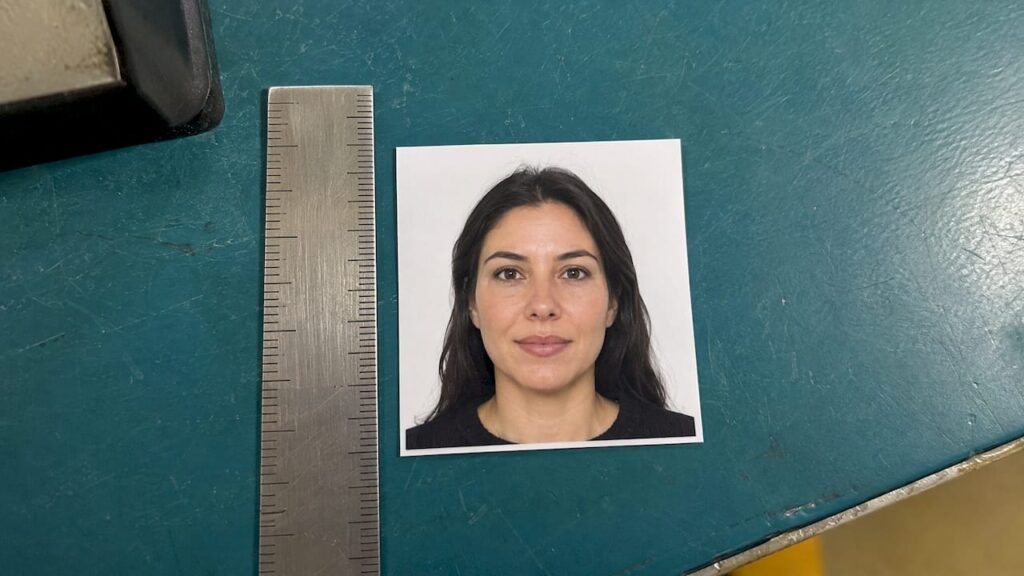
A U.S. visa photo is square. A printed photo measures 2 x 2 inches (51 x 51 mm), and a digital upload must be between 600 x 600 and 1200 x 1200 pixels. In both cases the head must fill 50% to 69% of the image height, and the photo must be taken within the last 6 months. The rest of this guide covers the details that cause rejections, and what to do if you are a U.S. citizen who landed here while sorting out a passport photo.
TL;DR
- Printed visa photo: 2 x 2 inches (51 x 51 mm), in color, on photo-quality paper, with a plain white or off-white background.
- Digital upload: square JPEG, 600 x 600 to 1200 x 1200 pixels, 240 kB or less, in color using the sRGB color space.
- Head size: 1 inch to 1 3/8 inches (22 mm to 35 mm), or 50% to 69% of the total image height.
- Taken within the last 6 months, neutral expression, eyes open, and generally no eyeglasses.
- U.S. citizens do not apply for a U.S. visa. If you need a photo for a U.S. passport, the print size is the same 2 x 2 inches, and we can help you get it processed fast.
Table of Contents
- The two sizes that matter: printed and digital
- Head size and framing inside the square
- Other rules that decide acceptance
- Which photo do you actually need: DS-160, DS-260 or a diversity visa entry?
- Visa photo vs. U.S. passport photo
- Are you a U.S. citizen? You probably need a passport photo
- Common reasons a photo gets rejected
- A quick checklist before you submit
- What we do: our perspective
- Match your timeline to the right route
- Get your passport moving with Fast Passport Center
- FAQ
- Sources
The two sizes that matter: printed and digital
The size depends on how you submit the photo. The State Department lists separate requirements for a printed photo and for a digital image, and the application type decides which one you need.
| Format | Dimensions | Other limits |
|---|---|---|
| Printed photo | 2 x 2 inches (51 x 51 mm) | Color, photo-quality paper, taken in the last 6 months |
| Digital image | Square, 600 x 600 to 1200 x 1200 pixels | JPEG, 240 kB or less, compression ratio 20:1 or less, 24-bit color, sRGB |
The digital limits come from the State Department’s digital image requirements. The image must be square, so a wide phone photo needs cropping before you upload it. A rectangular file is one of the most common reasons a system rejects an upload.
Why pixels and inches are different things
Inches describe a physical print. Pixels describe a screen image and have no inch size until printed. A 600 x 600 pixel file is the smallest accepted upload, but it would print small and soft at 2 x 2 inches if you tried to use it as your paper photo. If you need both, take the original at a higher resolution, then create a 600 to 1200 pixel version for upload and print the full-resolution file at 2 x 2 inches.
The file size trap
A 1200 x 1200 pixel photo straight from a modern phone often exceeds 240 kB. Compression solves that, but too much compression produces visible blocks around the face. If your upload fails, resize toward the middle of the range, such as 800 x 800 pixels, before compressing further. A sharper small image usually passes where a heavily compressed large one fails.
Head size and framing inside the square
The square is only half of the rule. The head must measure between 1 inch and 1 3/8 inches (22 mm to 35 mm) from the bottom of the chin to the top of the head, or 50% to 69% of the image’s total height, per the official photo requirements.
On a 600 x 600 pixel image, that puts the head between roughly 300 and 414 pixels tall. On a 1200 x 1200 pixel image, it is roughly 600 to 828 pixels. The face should be centered, looking straight at the camera, with the full face visible from the top of the hair to the chin.

A simple check before you submit: divide the pixel height of the head by the pixel height of the image. If the answer is below 0.50, you are too far away. If it is above 0.69, you are too close. Most self-taken photos fail because they are shot from too far away and the person fills only a third of the frame.
Other rules that decide acceptance
Size alone does not get a photo approved. The same State Department page sets out these conditions:
- Background: plain white or off-white, with no patterns, objects, or other people.
- Expression: neutral, with both eyes open and looking at the camera.
- Eyewear: eyeglasses are generally not allowed.
- Head coverings: religious head coverings are permitted if the full face is visible and the covering casts no shadows.
- Recency: taken within the last 6 months and reflecting your current appearance.
Shadows deserve special attention. A background that looks white to the eye can read as gray in a photo if you stand close to the wall or use a single side light. Stand a few feet from the wall and light your face evenly from the front.
Which photo do you actually need: DS-160, DS-260 or a diversity visa entry?
The form determines the format. Nonimmigrant applicants using Form DS-160 or DS-1648 upload a digital image, and some embassies or consulates also require one printed photo at the interview. Immigrant visa applicants using Form DS-260 must bring two identical printed photos to their interview, according to the State Department. For Diversity Visa Program entrants, the digital image must be exactly 600 x 600 pixels.
There is one practical point to plan for. If a digital upload for a nonimmigrant visa is rejected, the applicant must bring one printed photo to the interview, as the U.S. Embassy in Guyana explained in 2025. Many applicants keep a spare 2 x 2 inch print in their document folder regardless, so a technical glitch never delays an appointment.
Visa photo vs. U.S. passport photo
The two are close. A printed U.S. passport photo is also 2 x 2 inches with a plain white or off-white background, taken recently, with a neutral expression and generally no glasses. Our own guide to U.S. passport photo requirements covers size, background, attire, and rules in the passport context. The practical difference is the delivery method rather than the size. Visa applicants often upload a digital file, while a passport application submitted by courier or mail uses a printed photo attached to the paperwork.
Because the print sizes match, a good 2 x 2 inch photo that follows the head-size rule often serves both purposes. Still, check the instructions for the specific application you are filing, since agencies can add conditions and a rejected photo costs you time.
Are you a U.S. citizen? You probably need a passport photo
Many people searching for visa photo sizes are actually U.S. citizens preparing to travel abroad. A U.S. citizen does not apply for a U.S. visa. You need a valid passport, and for some destinations a visa issued by that country. If you are in that situation, your photo task is the passport photo, and your timeline decides everything else.
If your passport is expired, lost, damaged, or about to be, the photo is a small step in a bigger deadline. Take a look at how to take a U.S. passport photo at home without triggering a hold, and, if you already have a recent compliant print, whether you can reuse a passport photo when your trip is two to four weeks away. Parents of infants can read about the newborn passport photo options, which are the hardest to get right at home.
Common reasons a photo gets rejected
The same mistakes show up again and again, for visas and passports alike.
- Wrong crop. The image is not square, or the head is outside the 50% to 69% range.
- Shadows or a gray background. Often caused by standing too close to the wall or by uneven lighting.
- Glasses or glare. Eyeglasses are generally not allowed, and reflections hide the eyes anyway.
- Old photo. Anything older than 6 months, or a photo that no longer looks like you.
- Heavy editing. Filters, retouching, or AI enhancement can change facial features and cause a rejection.
- File problems. A file over 240 kB, the wrong format, or dimensions outside 600 to 1200 pixels.
On the passport side, photos are one of the typical reasons applications stall. Our list of the top reasons passports get rejected explains how to avoid each.
A quick checklist before you submit
Run your photo through these checks in order. First, confirm which form you are filing and whether it needs a digital image, a print, or both. Second, check that the image is square. Third, measure the head against the image height. Fourth, look at the background at full size on a screen, not a thumbnail. Fifth, confirm the file type and size. Sixth, if a print is required, print on photo-quality paper at exactly 2 x 2 inches with no borders and no scaling, since printer settings that “fit to page” quietly resize the image.
What we do: our perspective
We see photo problems every week, and they almost always arrive at the worst moment: a traveler discovers an expired passport three weeks before a trip and then learns the photo they took in the kitchen will not pass.
Our view is simple. A photo is a small part of the application, but it is the part people most often get wrong, because the rules look easy. Size, head position, background, lighting, and recency all have to be right at once. When one is off, the cost is not the photo. The cost is the days lost while the application is returned.
That is why we guide every customer through the photo and form details before anything is submitted. As a U.S. Department of State registered passport courier with more than 20 years of experience, we hand-deliver applications to passport agencies so you do not have to wait in a mail queue, and we keep you updated along the way. If you live a long drive from a regional passport agency, that matters. You get agency-level speed without the trip.
Match your method to your timeline. If you travel within 3 days or face a family emergency, an in-person appointment at a regional agency is the route. If you travel between 2 days and 4 weeks out, a courier is built for exactly that window. If you travel 4 or more weeks out, the post office can be enough. We would rather tell you which one fits than have you guess.
Andy Irons
Match your timeline to the right route
The photo is only useful if the application it goes into arrives in time. Here is how we advise travelers to think about it.
Travel within 3 days, or a family emergency. Only a regional passport agency can help, and it is in-person only. You will need documented urgent travel and an appointment.
Travel between 2 days and 4 weeks out. This is where an expediting courier earns its fee. It is also where most people living in cities such as Tampa, Charlotte, Sacramento, Nashville, and Louisville find themselves, since the nearest regional agency is a long drive away. A courier handles the form review, the photo check, the delivery to the agency, and the tracking.
Travel 4 weeks or more out. Standard routing through a post office acceptance facility can work. Even so, a photo mistake can push you out of that comfortable window, so check it carefully.

Get your passport moving with Fast Passport Center
If your trip is between 2 days and 4 weeks away and your passport is expired, lost, damaged, or missing altogether, we can take it from here. Our agents review your form and photo, our courier hand-delivers your application to the passport agency, and you can follow your order as it moves. We offer drop-off in 24 cities, or secure shipping if there is no office near you.
Start with the service that matches your situation: passport renewal if your last passport is on hand, a new passport for a first-time adult or child applicant, or browse all of our expedited passport services. Prefer to compare your options first? The Forms and Documents page lists what to gather.
FAQ
What size is a U.S. visa photo in inches?
A printed U.S. visa photo is 2 x 2 inches (51 x 51 mm). The head must measure between 1 inch and 1 3/8 inches, which is 50% to 69% of the image height. It must be in color on photo-quality paper and taken within the last 6 months.
What are the pixel dimensions for a digital U.S. visa photo?
The image must be square, between 600 x 600 and 1200 x 1200 pixels, in JPEG format. The file must be 240 kB or less. Diversity Visa Program entrants must submit exactly 600 x 600 pixels.
Do I need a printed photo if I upload one online?
It depends on the visa. Some embassies and consulates require nonimmigrant applicants to bring one printed photo to the interview, and immigrant visa applicants using Form DS-260 must bring two identical photos. If your upload is rejected, bring a print. Check the instructions for your embassy or consulate.
Is a visa photo the same as a U.S. passport photo?
The printed size is the same, 2 x 2 inches, and the basic rules are similar, including a plain white or off-white background and a neutral expression. Always follow the instructions for the specific application, since each one has its own submission method.
I’m a U.S. citizen with a trip coming up. Do I need a visa photo?
No. U.S. citizens need a passport, and some destinations also require a visa from that country. Your photo task is the passport photo. If time is short, we can help expedite the passport and check your photo before it is submitted.
Sources
- Photo Requirements, U.S. Department of State
- Digital Image Requirements, U.S. Department of State
- Ask the Consul, November 2025, U.S. Embassy in Guyana